


Is Wireless Charging Bad for Battery? Heat and Overnight Tips

Wireless charging does not automatically damage your battery. Repeated heat buildup and prolonged time at a high charge level can contribute to battery aging. This guide explains why your phone gets warm, how to improve your setup, and when wired charging makes more sense.
You do not need to abandon a convenient charging routine simply because your phone feels slightly warm. Start by checking the environment, alignment, and battery settings. Those checks are more useful than assuming every wireless charger is harmful—or that every wired charger is better.
Does Wireless Charging Damage Your Battery?
Wireless charging is not inherently damaging, but a setup that repeatedly makes your phone hot deserves attention. A battery ages through use and time; the charging method alone does not tell you how quickly that will happen. Temperature history and charging patterns both influence chemical aging. See Apple: Battery Aging and Care.
It helps to separate two ideas. Battery life is how long your phone runs before it needs another charge. Battery lifespan is how long the battery remains useful as its capacity gradually declines. A phone that charges slowly today does not necessarily have a damaged battery, and a full battery does not necessarily have its original capacity.
For daily use, focus on avoidable heat and a routine that fits your needs. A battery-health reading alone cannot establish whether wireless charging caused a change. Device age, usage, settings, and charging conditions also affect the result.
Why Does Wireless Charging Make Your Phone Warm?
Wireless charging transfers energy between coils, and some energy is lost as heat. Alignment, separation between the coils, and other heat sources can change how warm the phone becomes. Slight warmth is not, by itself, proof of battery damage.
Energy Loss and Coil Alignment
A transmitter coil in the charger creates a changing magnetic field, which induces voltage in a receiving coil in the phone. Transfer efficiency depends on the coils and how well they couple, including their distance and angle.
That is why placement matters. With a charging pad, use the position recommended by its manufacturer. With a magnetic charger, confirm that the phone and case support the intended setup. Magnets help position devices, but attachment alone does not establish charging compatibility.
Cases, Room Temperature, and Phone Use
A thick or unsuitable case can interfere with charging, while direct sunlight adds heat before charging even begins. Gaming, video calls, and other demanding tasks can add another heat source. If your phone feels noticeably warmer during those activities, pause them and compare charging with the screen off.
Ambient temperature is not battery temperature: Apple advises against charging iPhone in ambient temperatures above 95°F (35°C). That is the temperature of the surrounding air—not a universal cutoff for the phone's surface or internal battery. Touch alone cannot measure battery temperature accurately.
How to Reduce Heat During Wireless Charging
Start with the surroundings, then check placement and accessories. Change one thing at a time so you can see what improves charging. If a temperature warning appears, stop charging and let the phone cool naturally before testing again.
- 1. Cool the SetupMove out of direct sunlight. Use an uncovered, ventilated surface.
- 2. Check the FitRemove cards and interfering accessories. Reposition the phone.
- 3. Check the ResultLook for the charging icon and any temperature or battery-setting message.
Start with a Cool, Ventilated Setup
Place the charger on a firm surface with space around it, following its instructions. Keep the phone and charger uncovered, rather than under bedding. If the phone is already hot after navigation or outdoor use, leave it idle in a cooler place first. Do not try to override a temperature pause by immediately switching to a cable.
Once the phone has cooled, pause demanding apps, turn the screen off, and try again. Check whether charging resumes and the battery percentage increases while the phone is idle.
Check Your Case and Magnetic Alignment
Remove cards or metal objects between the phone and charger. If charging is slow or intermittent, try without a thick, metal, or battery case. Reposition the phone as instructed, then look for the charging indicator after a few seconds.
If removing the case restores reliable charging, check its compatibility before putting it back. If the same problem continues without the case, inspect the power connection and try a known-working, compatible charger. If pauses continue, check whether a temperature message, charge limit, or optimized charging setting explains them before replacing equipment.
Choose a Compatible Charger and Power Adapter
Check the supported phone models, case requirements, recommended adapter, and certification information before choosing a charger. Qi2 magnetic alignment helps improve transfer efficiency, and certified products undergo safety and interoperability testing. See WPC: Qi2 Alignment and Certification. Better alignment is useful, but it does not guarantee a cool phone in every environment.
For a desk or nightstand shared by an iPhone, Apple Watch, and a compatible AirPods wireless charging case, the VRURC Foldable 3-in-1 Magnetic Wireless Charger is one option. Magnetic alignment helps position the phone, while the folding stand and included 45W adapter simplify a multi-device charging setup. Correct placement and ventilation remain important during use.
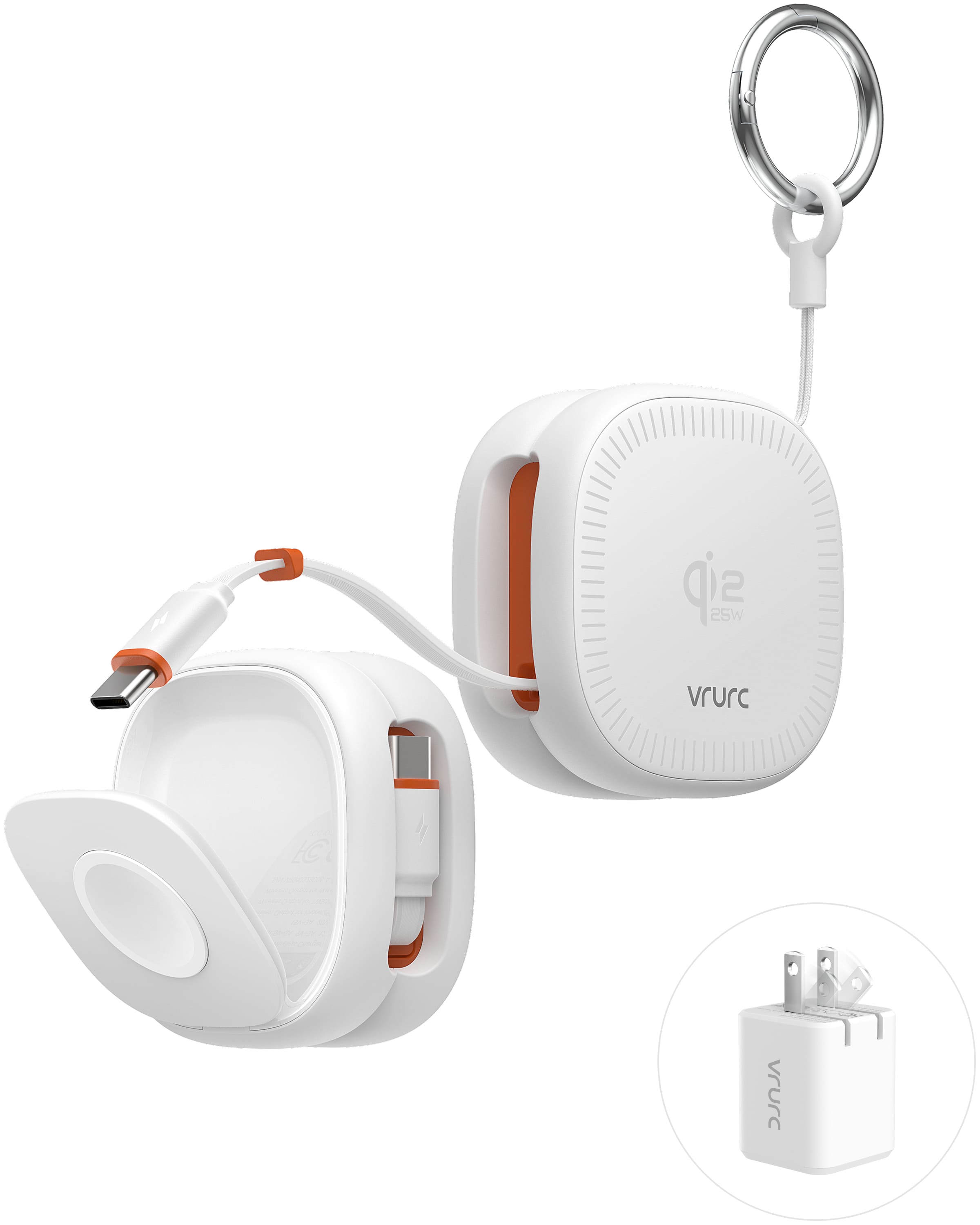
VRURC Foldable 3-in-1 Magnetic Wireless Charger
Magnetic Alignment | Foldable Stand | 45W Adapter Included
View Current Price
Shop NowCheck the exact device list before ordering. The product page specifies bare phones or compatible magnetic cases up to 2mm thick and excludes Samsung and other Android phones. The advertised 25W maximum is not available on every compatible phone; actual charging power depends on the phone, software, and charging conditions.
Wireless vs. Wired Charging: Which Should You Choose?
Choose according to your device, available time, and charging conditions. Wireless charging offers convenient placement; a suitable wired setup is useful when you want a direct connection. Both require attention to temperature and compatible accessories.
| Factor | Wireless Charging | Wired Charging |
|---|---|---|
| Charging speed | Depends on the phone, charger, adapter, alignment, and temperature. | Depends on the phone, cable, adapter, supported protocol, and temperature. |
| Heat checks | Check case fit, coil alignment, surroundings, and phone activity. | Check surroundings, phone activity, and cable or adapter condition. |
| Everyday convenience | Easy to set down for a desk or bedside top-up. | A physical connection that lets you move the phone within the cable's reach. |
| Phone port use | No repeated cable insertion into the phone. | Requires a sound connector and compatible cable. |
| Battery care | Keep the setup cool and use supported charging controls. | The same temperature and charging-habit considerations apply. |
If you need a quick top-up, compare the supported charging capabilities rather than assuming any cable beats any wireless charger. For a wired setup, check that the phone, cable, and adapter support the intended fast-charging protocol. For wireless charging, check the supported power for the specific phone and charger combination. A low-power adapter can limit either setup.
For routine charging at a desk, wireless charging may be the more convenient choice. If wireless charging repeatedly pauses despite correct placement and a compatible case, let the phone cool, then compare with a known-working wired setup. A difference helps identify what to investigate; it does not measure long-term battery wear.
Is Wireless Charging Bad for Battery Overnight?
Overnight charging is not automatically harmful, but temperature and time spent fully charged still matter. As explained in Apple: Overnight Charging and Battery Care, iPhone automatically stops charging when full. Preventing overcharging, however, does not eliminate the effects of heat or prolonged time at a high charge level.
Overcharge Protection vs. Time at Full Charge
There is no need to disconnect your phone at the exact moment it reaches 100%. Enable the available charging controls and keep the phone and charger uncovered on a ventilated surface, away from bedding and direct sunlight.
Use Optimized Charging or a Charge Limit
On supported iPhones, these settings can reduce time at full charge. Follow Apple: Charge Limit and Optimized Battery Charging:
- On iPhone 15 and later: open Settings > Battery > Charging. Choose a supported charge limit that fits your daily needs. When the limit is set to 100%, enable Optimized Battery Charging if you want the phone to manage the timing of a full charge.
- On iPhone 14 and earlier: open Settings > Battery > Battery Health & Charging and enable Optimized Battery Charging.
- Check what happens: a charge limit should stop charging near the selected level. Optimized charging may delay charging past 80% when it predicts an extended connection.
If optimized charging does not activate every night, it is not necessarily a fault: it needs a predictable routine. A phone using a lower limit may occasionally reach 100% to maintain accurate charge estimates. Menu labels can vary with software version.
Choose a limit that meets your daily power needs; keeping the battery strictly between 20% and 80% is not a requirement for normal use. A full charge before a long trip is a practical choice. The goal is to reduce avoidable heat and unnecessary hours at full charge without making the phone inconvenient to use.
Frequently Asked Questions
Does Every Wireless Top-Up Count as a Charge Cycle?
No. A charging session is not the same as a complete cycle. Apple counts a cycle when cumulative battery use reaches the equivalent of 100% capacity. For example, using 60% one day and 40% the next adds up to one cycle, even if you recharge in between. You do not need to drain the phone before topping up. See Apple: Lithium-ion Charge Cycles.
What If Wireless Charging Keeps Pausing?
Read the message first, then check the setup. A pause at a selected limit or during optimized charging differs from a temperature pause. For heat, remove the phone from the charger and let it cool. Otherwise, check the adapter, cable connections, case, and alignment. If neither wireless nor wired charging works reliably, read iPhone Not Charging? Step-by-Step Fixes That Help. Stop using a swollen, visibly damaged, or unusually hot device and seek service.
Do iPhone and Samsung Phones Need Different Wireless Chargers?
Not always, but the phone and charger must support compatible wireless charging standards, alignment methods, and power levels. An iPhone magnetic charger is not automatically compatible with Samsung phones. Check both manufacturers’ compatibility lists before buying. This VRURC model is designed for supported iPhone, Apple Watch, and AirPods setups and explicitly excludes Samsung and other Android phones.
Your next step: check your battery settings and current charging position before replacing equipment. If you need a tidier multi-device setup, review the VRURC charger's compatibility and specifications to see whether it matches your devices.


